
Publishing management software
Your whole publishing house in one place.
Titles, production, contracts, royalties and sales, on the web and on iPhone, with one account. Import your catalogue from an Excel file and start working in minutes.
For publishers, imprints and publishing groups. Interface in Türkçe, English, Deutsch and Español.
Every part of publishing, connected.
A title’s metadata, editions, contracts, royalties and sales live in one record. The same figure reads the same in every report.
-
Title management
Metadata, ISBNs, cover images, back-cover copy and editions. Your catalogue is always up to date.
-
Production workflow
From the submission pool to ISBN, typesetting and the printer; see where every title is waiting.
-
Contracts and royalties
Contracts, end dates and royalty statements, from sales and from print runs.
-
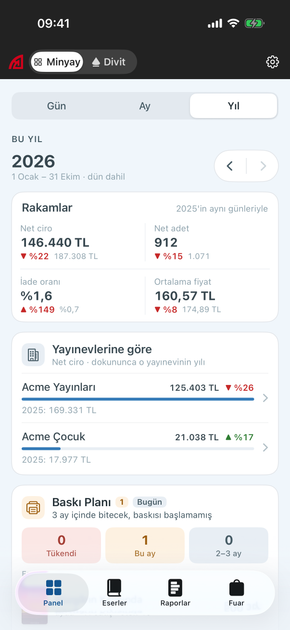
Sales reports
Sales by title, customer, imprint and author; year-on-year comparison and Excel export.
-
Book fairs
A tablet sales app that keeps working offline, plus a day-by-day fair report.
-
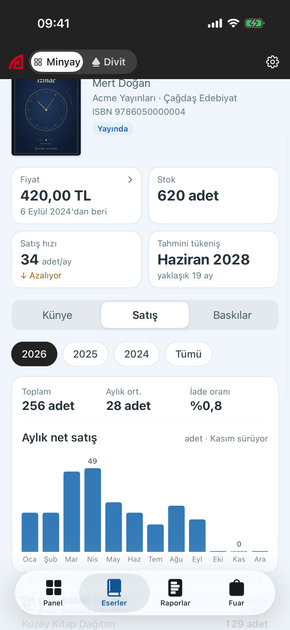
Reprint planning
The sales pace index shows when each title will sell out and when to reprint it.
-
Profit and loss
Cost, revenue and profit per title and per print run, visible only to the people you allow.
-
Integrations
Sales, stock and price data arrive automatically from your accounting and stock systems.
AI assistant
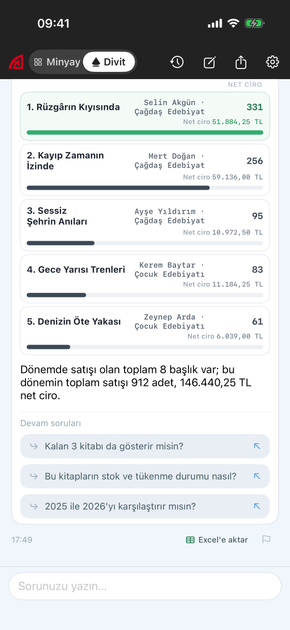
Ask Divit, and it prepares the report.
Divit reads your publishing data with your own permissions and answers your questions with figures.
- It only reads; it never changes any data.
- It sees only the data you are allowed to see.
- Answers arrive in 10–30 seconds and can be exported to Excel or shared.
Answers may contain mistakes.
iPhone app
Your publishing house in your pocket.
Follow sales, stock, fairs and title details from anywhere, and ask Divit on the go. The app works with the same permissions as the web and is protected with Face ID.
Download on the App StoreNothing to install.
Open your account, import your catalogue, invite your team.
-
Open your account
Confirm your e-mail address and enter your publisher’s name. The account comes ready with lists in your language.
-
Import your catalogue
Upload an Excel or CSV file; columns are matched automatically and ISBNs are checked.
-
Invite your team
Give each person only the sections they need; sales, stock and profit are visible by permission.
“I have grown so used to how easy Minyay makes things that I am slowly forgetting how publishing worked without it.”
Translated from Turkish.
Frequently asked questions
Which publishers is Minyay for?
Book publishers of every size, from single-imprint houses to publishing groups with several imprints. Each imprint is tracked on its own; reports can be run per imprint or for the whole group.
How do I bring my catalogue into Minyay?
After opening your account, upload your titles as an Excel or CSV file. Minyay matches the columns automatically, checks the ISBNs and skips titles that are already there.
Does it work with my accounting software?
Yes. Sales, stock and price data can be brought in from systems such as LOGO, Netsis, Luca, SAP and Nebim; publishers without accounting software can use Minyay on its own.
Where is my data stored?
Your data is stored on Amazon Web Services (AWS) infrastructure and every connection is encrypted. Each person sees only the sections you give them.
Does Divit change my data?
No. Divit only reads, and only the data you are allowed to see. Answers may contain mistakes, so check important figures against the reports.
Which languages are supported?
Sign-up, catalogue import and the pages of the new interface are available in Turkish, English, German and Spanish. Other sections and the iPhone app are in Turkish for now; translations are being added step by step.
How do I use the iPhone app?
Download the app from the App Store and sign in with your Minyay account. It works with the same permissions as the web and is protected with Face ID.
Bring your publishing house to Minyay today.
Opening an account takes a few minutes. Our team is here for your questions.
No credit card needed.